WordPix - Guess Word Picture
HYPERCELLWord
4.6619.00 Reviews
- Version
- 4.7.1
- Installs
- 1.00M
- Age Rating
- Everyone
Screenshots


Our Review of WordPix - Guess Word Picture
 Analysis by Appyee
I usually reach for a picture-and-word puzzle when I have a few spare minutes but don’t want to switch off completely. WordPix - Guess Word Picture fits that mood: it asks me to turn visual clues into a word, so a round can feel light while still giving my attention something to do. It is a word game from HYPERCELL, and the basic appeal is easy to understand before you commit much time to it.
Quick rounds, with room to pause
The format suits the small gaps in an ordinary day: waiting for a drink, sitting through a quiet commute, or taking a short break between tasks. I can focus on the picture, try a few letter combinations, and put the phone down once I’ve had enough. That makes it less demanding than a long-form word challenge that expects me to remember a board or maintain a streak of uninterrupted play.
The game’s pace depends less on tapping quickly than on noticing what the image might suggest. Some clues may prompt a direct association; others ask me to consider whether the pictures share an idea or point toward a less obvious word. That shift from seeing to interpreting is the part I find most engaging. If I answer quickly, the round feels brisk. If a clue doesn’t click, the same format can turn into a slower word-searching exercise.
For a more comfortable session, I’d treat each image as a small deduction rather than immediately guessing every possible word. I look first for the most obvious object, then ask what detail might be doing the real work: the setting, an action, a familiar expression, or a relationship between visual elements. This simple routine helps avoid burning through guesses based on the first thing that comes to mind.
What the picture format does well
Compared with a crossword, WordPix puts more weight on visual association than on crossing letters or solving a long clue. Compared with a conventional word search, it asks for interpretation rather than scanning a grid. That difference makes it a good fit if I enjoy trying to connect an image with a word, but it may not satisfy someone who wants a deep vocabulary lesson, complex logic chains, or a competitive puzzle format.
The picture-led approach also changes who might enjoy it together. I can imagine handing the phone to a friend or family member and asking what the image brings to mind; people often notice different details. That can make a stuck moment more social without needing a formal multiplayer feature. On the other hand, if I want a structured head-to-head contest, a game built specifically around competition would be a better choice.
A useful habit is to say possible answers aloud before selecting letters. Hearing a word can make a phrase or association easier to spot, and it gives another person a simple way to join in. I also find it helpful to step back for a few seconds when I’m stuck. Continuing to stare at the same image can lock me into one interpretation; a brief pause can make another clue stand out.
How WordPix feels in everyday play
Ever stumbled upon a game that’s both challenging and a total blast? Well, let me introduce you to WordPix - Guess Word Picture. This game is a delightful blend of fun and mind-boggling puzzles that’s been keeping me hooked for hours.
What’s the Buzz About?
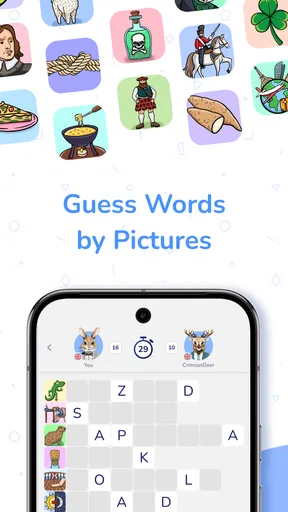
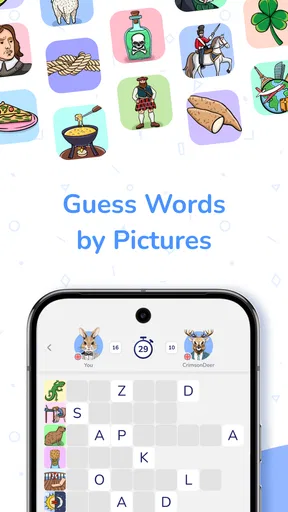
So, WordPix is essentially a word puzzle game with a simple yet addictive concept. You’re presented with a series of pictures, and your task is to guess the word they’re trying to convey. Sounds easy, right? Well, think again! The game cleverly combines visual clues with wordplay, making every level a unique challenge.
Gameplay Galore
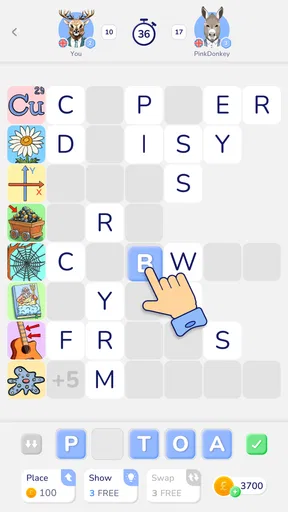
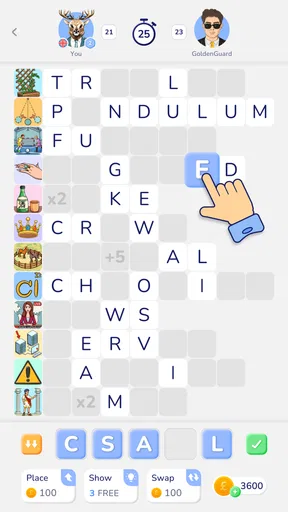
Once you dive into the game, you’re greeted with a clean and intuitive interface. The graphics are crisp, and the pictures are vibrant, making it visually appealing. The game starts off easy, giving you a chance to get the hang of things. But don’t let the initial levels fool you; the difficulty ramps up pretty quickly, which keeps things interesting.
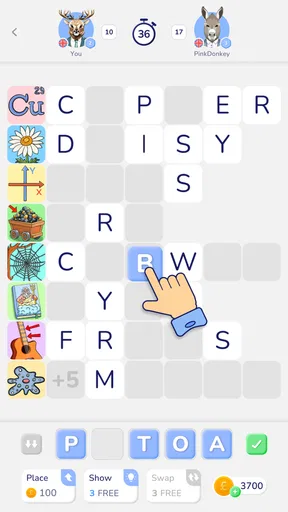
Each level presents you with a picture, and you have to guess the word associated with it. You can use the letters provided below the image to form the word. If you’re stuck, there are hints available, but use them wisely as they’re limited!
Why I’m Hooked
What I love most about WordPix is the mix of challenge and satisfaction. There’s a certain joy in cracking a tricky level after pondering over it for a while. The game also helps sharpen your observational skills and vocabulary. Plus, it’s perfect for those idle moments when you want to kill some time while keeping your brain engaged.
Another great aspect is its accessibility. Whether you’re playing on Android or iOS, the game runs smoothly without any glitches. It’s also lightweight, so it won’t hog your device’s resources.
Speed, pauses, and tougher sessions
In practice, the game’s speed is mostly about how quickly I recognize a clue, not about racing a clock. That makes it approachable when I want a calm puzzle rather than a reflex test. It also means a difficult image can hold me up longer than expected. I wouldn’t open it expecting every round to take the same amount of time, especially when the answer isn’t an immediate visual association.
For a heavier session, I’d set a modest stopping point instead of assuming I’ll play for only a minute. One challenging clue can encourage me to keep trying, and the satisfaction of solving it is part of the draw. If I’m already tired or short on patience, though, a picture that feels ambiguous can become frustrating. At that point, taking a break is more useful than repeatedly entering guesses.
Hints are worth treating as a limited resource, as the game’s play description presents them that way. I’d first check the image for details I may have overlooked and consider whether the answer is a concept rather than the literal name of an object. Only after those checks would I use help. This approach preserves the satisfaction of solving a clue while giving me a sensible way forward when I’m genuinely stuck.
Who it suits—and when I’d choose something else
I’d recommend WordPix to casual players who like short word puzzles, visual clues, and a little trial-and-error without needing to study a large rule set. It can also work for someone who wants a low-pressure way to pass a wait, or for two people who enjoy offering guesses together. Its Everyone age rating makes the intended audience broad, though younger players may still need help with unfamiliar words or less direct associations.
I’d steer away from it if your main goal is a rigorous vocabulary course, a crossword-style challenge with intersecting answers, or a game that clearly centers on competing with friends. The picture clue is the whole appeal, but it is also the source of occasional friction: if I interpret an image differently from the intended answer, the puzzle can feel less like a test of knowledge and more like a test of guessing the designer’s association.
For a realistic example, I might open it while waiting for a takeaway order, solve a clue or two, then leave the next one for later if the line moves. That stop-and-start use is more natural here than trying to reserve a long, uninterrupted session. If I’m sharing the screen, I’d let each person explain their interpretation before using a hint; that turns disagreement into part of the fun instead of making one person’s guess feel like the only possible reading.
Room for Improvement?
While WordPix is pretty awesome, there are a couple of things that could enhance the experience. For instance, adding more varied hint options could be a nice touch. Sometimes, just revealing a letter isn’t enough, and a different type of hint could make the game even more enjoyable.
Moreover, integrating a multiplayer mode where you can challenge friends might add a competitive edge that many players would appreciate. Imagine battling it out to see who can guess the word first!
Reliability, device fit, and value
I judge a casual puzzle partly by whether I can pick it up without turning play into device management. The game is available for Android and iOS, and its current version is 4.1.0. Still, individual performance can depend on the phone or tablet and its software, so I wouldn’t promise identical speed or stability on every device. If a puzzle pauses or behaves unexpectedly, reopening it and returning to the clue is a sensible first step; I would avoid assuming that progress recovery works in a particular way.
The minimum operating-system requirement is 7.0, which gives a useful compatibility check before installing. I’d also keep the usual practical limits in mind: an older device may feel less responsive than a newer one, and extended play can be less comfortable if the screen is small or the image is hard to inspect. For a picture puzzle, being able to see details clearly matters more than having a large amount of spare processing power.
WordPix is free to download, with in-app purchases priced from $0.99 to $20.99 per item. I’d start with the free experience and decide whether any optional spending makes sense for my own play, rather than treating a purchase as necessary to enjoy the basic idea. The game has a 4.6 average from around 42,000 ratings and over 1 million installs, which suggests it has found a sizable audience, though those figures can’t tell me whether every clue will suit my taste.
Final Thoughts
Overall, WordPix - Guess Word Picture is a gem in the world of word puzzles. It’s engaging, challenging, and incredibly satisfying. Whether you’re a word game aficionado or just looking for something new to try, this game is definitely worth checking out. Just a friendly warning: it might get a little addictive!
So, are you ready to put your vocabulary to the test? Download WordPix today and get ready to embark on a picture-perfect word adventure!
Privacy and Permissions
See what permissions an app requests and how it handles your data.
- Wi-Fi connection information
- view Wi-Fi connections
- Other
- view network connections, full network access, control vibration, prevent device from sleeping, Google Play license check, read Google service configuration
Verdict
Strengths of WordPix - Guess Word Picture
- Engaging puzzles with increasing difficulty.
- Visually appealing and intuitive interface.
- Offline play available for on-the-go fun.
- Hints system helps when you're stuck.
- Frequent updates with new content.
Limitations of WordPix - Guess Word Picture
- Ads can be intrusive during gameplay.
- Limited free hints available initially.
- Some puzzles feel too similar.
- Requires in-app purchases for extras.
- May drain battery on older devices.
Other Releases by HYPERCELL
View All


Similar Picks in This Category
View All
Word Search - Word Puzzle Game
Bluetile4.8

Word Search Quest - Puzzles
Blackout Lab4.8

CodyCross: Crossword Puzzles
Fanatee, Inc.4.7

Words of Wonders: Crossword
Fugo Games4.9

Wordscapes: Word puzzle game
PeopleFun4.7

Word Search Explorer
PlaySimple Games4.9
Frequently Asked Questions
What is the main objective of WordPix - Guess Word Picture?
WordPix - Guess Word Picture is a puzzle game that challenges players to guess a word based on a series of pictures provided. Each set of images gives visual clues that relate to a specific word, requiring players to think critically and creatively to solve the puzzle.
Are there any in-app purchases in WordPix - Guess Word Picture?
Yes, WordPix offers in-app purchases. These can include additional hints, special levels, or removing ads for an uninterrupted gaming experience. While the game is free to download, these purchases can enhance gameplay by providing extra support when puzzles become challenging.
Is WordPix - Guess Word Picture suitable for all age groups?
WordPix is designed to be family-friendly and is suitable for players of all ages. The game’s simple mechanics and engaging puzzles make it accessible to children, while the complexity of some puzzles can also appeal to adults who enjoy word games.
Does WordPix - Guess Word Picture require an internet connection to play?
WordPix can be played offline, allowing users to enjoy the game without a constant internet connection. However, some features, such as downloading new levels or accessing certain online functionalities, may require connectivity.
How can I get help if I’m stuck on a level in WordPix - Guess Word Picture?
If you're stuck on a level, WordPix provides hints that can be used to reveal letters or remove unused ones, helping you guess the word. Additionally, players can use in-app purchases to gain more hints or seek assistance from friends through social sharing options.
Play our best games!


